Drake Tax - 1040: State Returns - Full-Year, Part-Year (Multi-State), or Non-Resident Selections
Article #: 12885
Last Updated: May 18, 2026

To indicate the resident state, on federal screen 1, select the applicable state from the Resident State drop list.
Multi-State/Part-Year Residency
For a part-year resident, on federal screen 1, select PY Part Year Res. from the Resident State drop list.
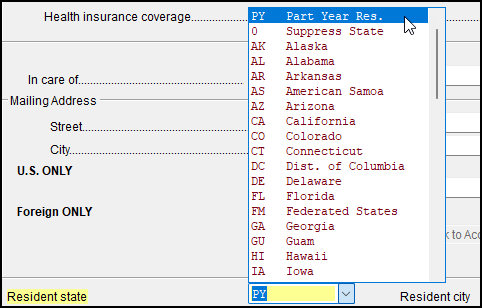
After making the federal selection, navigate to the state specific data entry screens to complete any required part year residency information, such as dates of residency, for each state in which the taxpayer lived.
Important Even if all state part year forms are filled out, the states do not begin to produce part year information until federal screen 1 is marked PY.
The dates are not used to allocate amounts. Items flow to the state that is selected in the ST drop down on federal screens. In some cases, a state will pull federal amounts and adjustments may be needed in state-specific data entry.
An individual return marked PY (for Part Year Resident, in the Resident state field on screen 1) requires the ST drop list on some federal screens to be entered - select a state in the ST field if you intend to e-file. These fields are color coded with the default color being light blue.
Once data entry begins on these screens, if you have not made a state ST selection, before you exit the screen, one or more of the following will happen:
-
you may be prompted to make a selection,
-
an unnumbered EF message is produced in view mode that prevents e-filing,
-
the screen link on the data entry menu is color coded light blue for identification.
The ST field is optional in returns for full year state residents.
Multiple Part-Year States, One Nonresident
Generally, state returns follow the part year residency status entered on federal screen 1. Some state data entry screens provide an override that allows the taxpayer to be defined as a nonresident of that state in cases where PY is entered as the resident state on federal screen 1.
If an override is not available, you will have to complete and either print or e-file the PY states. You can then generate a nonresident status for the state in question by entering another state on screen 1 as resident state.
No State Returns Needed
To indicate that there are no state returns needed for a taxpayer, on federal screen 1, select 0 Suppress State from the Resident State drop list. This will prevent all state returns from being generated.