Drake Tax - GBC and 3800 Screens for General Business Credits
Article #: 13824
Last Updated: September 15, 2026

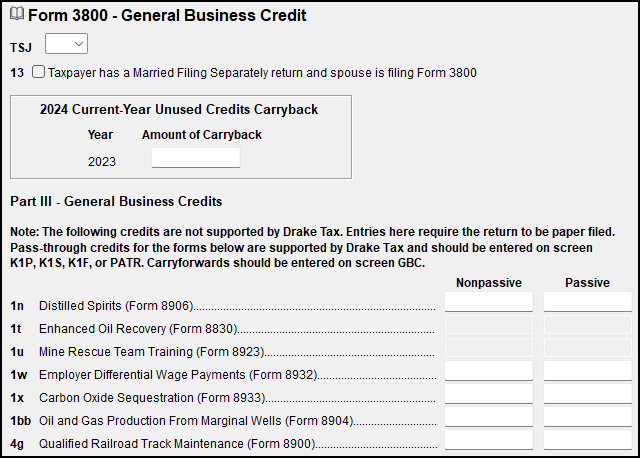
Pass-through business credits from partnerships, S corporations, trusts, or 1099-PATR that are supported by Drake Software are entered on K1P, K1S, K1F, or PATR screens, as appropriate.
Credits that are not supported by Drake Software can be entered on screen 3800 in either the Nonpassive or Passive columns. Returns with these credits cannot be e-filed.
General Business Credit Carryforwards and Carrybacks are entered on the GBC screen.
Choose a credit from the Description of credit list. Press Page Down to enter each additional credit.
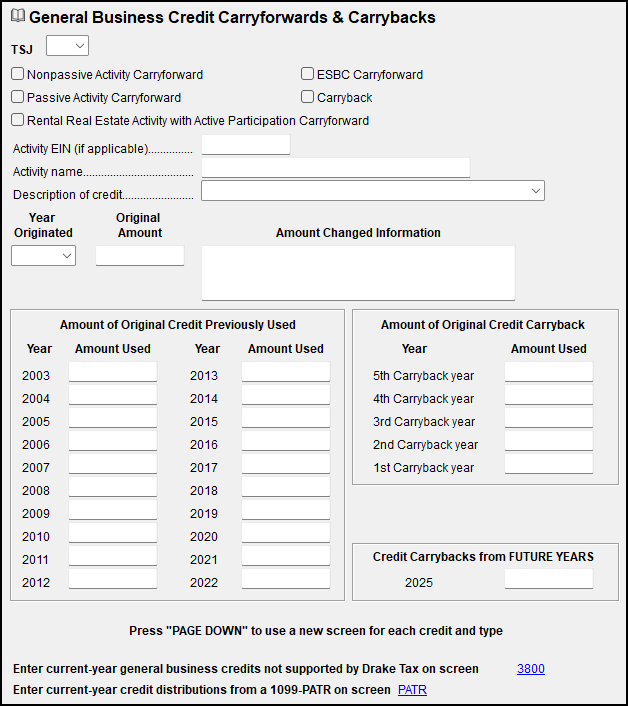
Carryforward amounts flow generally to Part I of Form 8582-CR, line 4 (which flows from Part III of Form 3800), and to any corresponding worksheets. The 8582-CR worksheet names begin Wks CR.
Important There is no direct data entry for Form 3800 in Drake Tax for Form 1065 (Partnership) or Form 1120-S (S Corporation) returns.
For these return types, the information required by partners or shareholders to complete Form 3468 on their individual returns is reported on K-1 Form 3468.
Form 3800 is only applicable at the partnership or S corporation level when an elective transfer credit is involved. This scenario is not currently supported in Drake Tax.
EF Message 5698
EF Message 5698 generates if, on screen GBC, the total of the "Amount of original credit previously used" and the "Amount of original credit carryback" is equal to or greater than the "Original Amount." To clear this message, open screen GBC and review data entry. If the "Original Amount" has been completely used, press Ctrl+D to delete the screen for this credit.
EF Message 5699
EF Message 5699 generates if the year in which the credit originated has not been entered or is invalid. To clear this message, review data entered on the GBC screen for credit carryovers Codes C & G. If there is no amount left of the original credit, use Ctrl+D to delete the GBC screen for this credit.