Drake Tax Online - Returns, Charges, and Tax Years
Article #: 18938
Last Updated: August 04, 2026

In Drake Tax Online (DTO), returns are tied to the tax year and are redeemed when certain actions occur inside a return.
Returns:
-
Are specific to a single tax year
-
Do not roll forward to future years
-
Cannot be refunded once redeemed
This article explains how return charges work and what to expect. For information about purchasing returns, see Drake Tax Online - Purchasing.
Tip Watch the video Drake Tax Online - Return Charges.
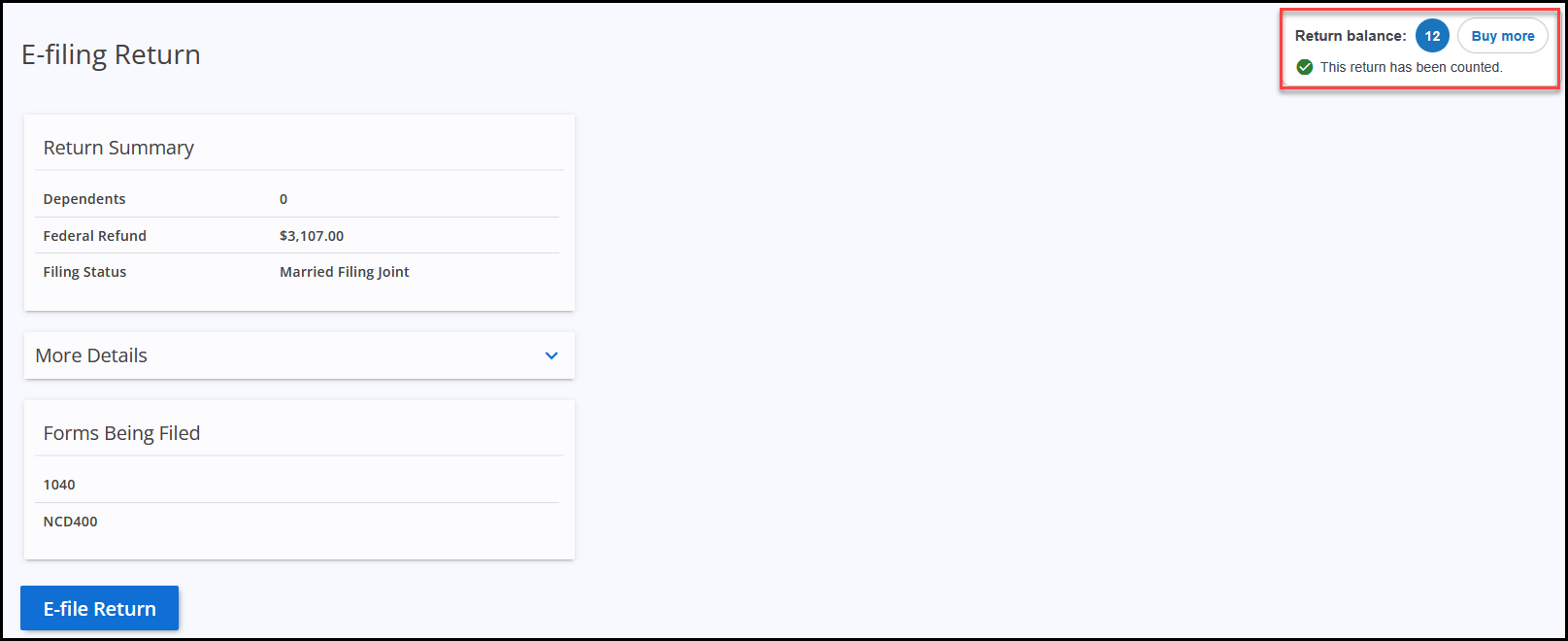
Return Counted
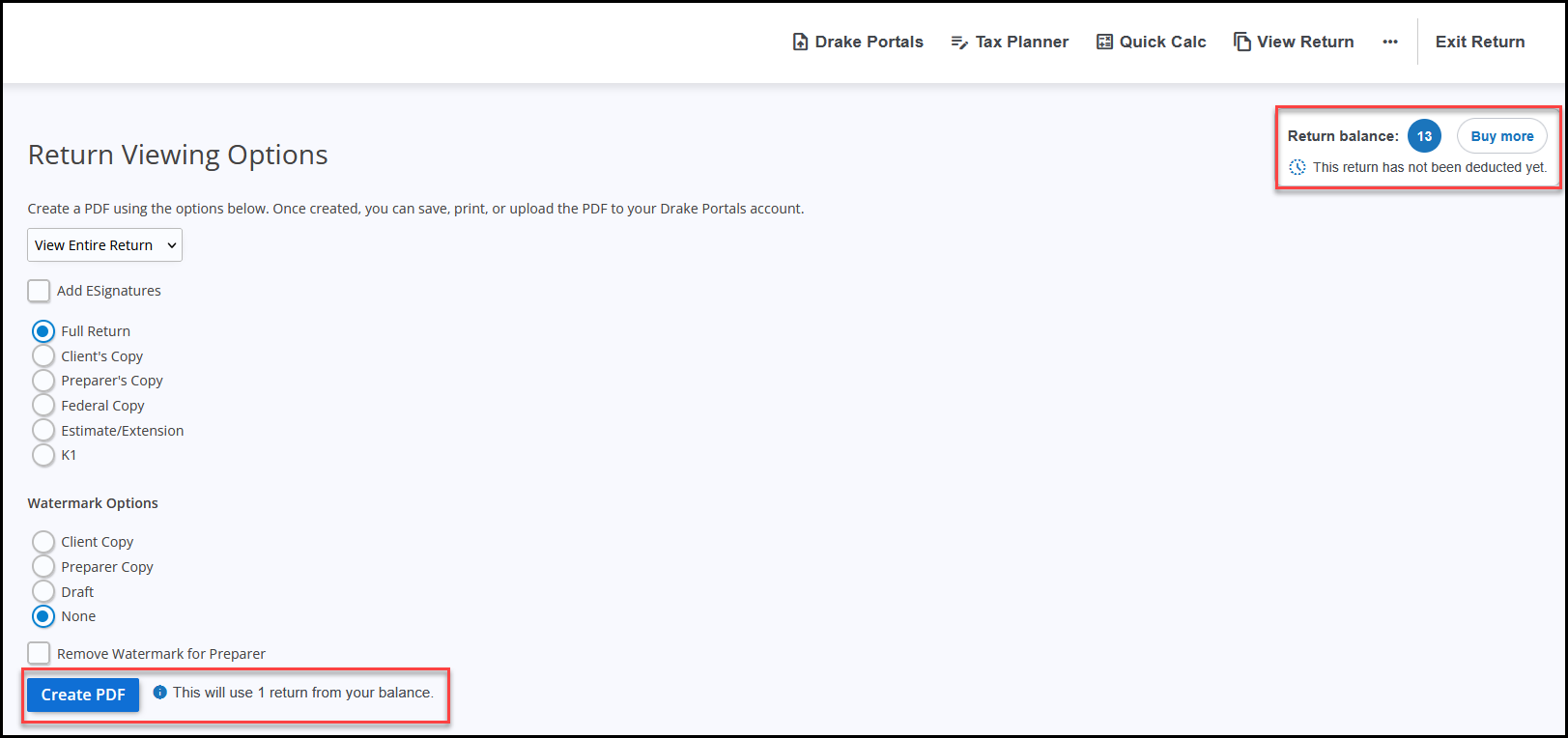
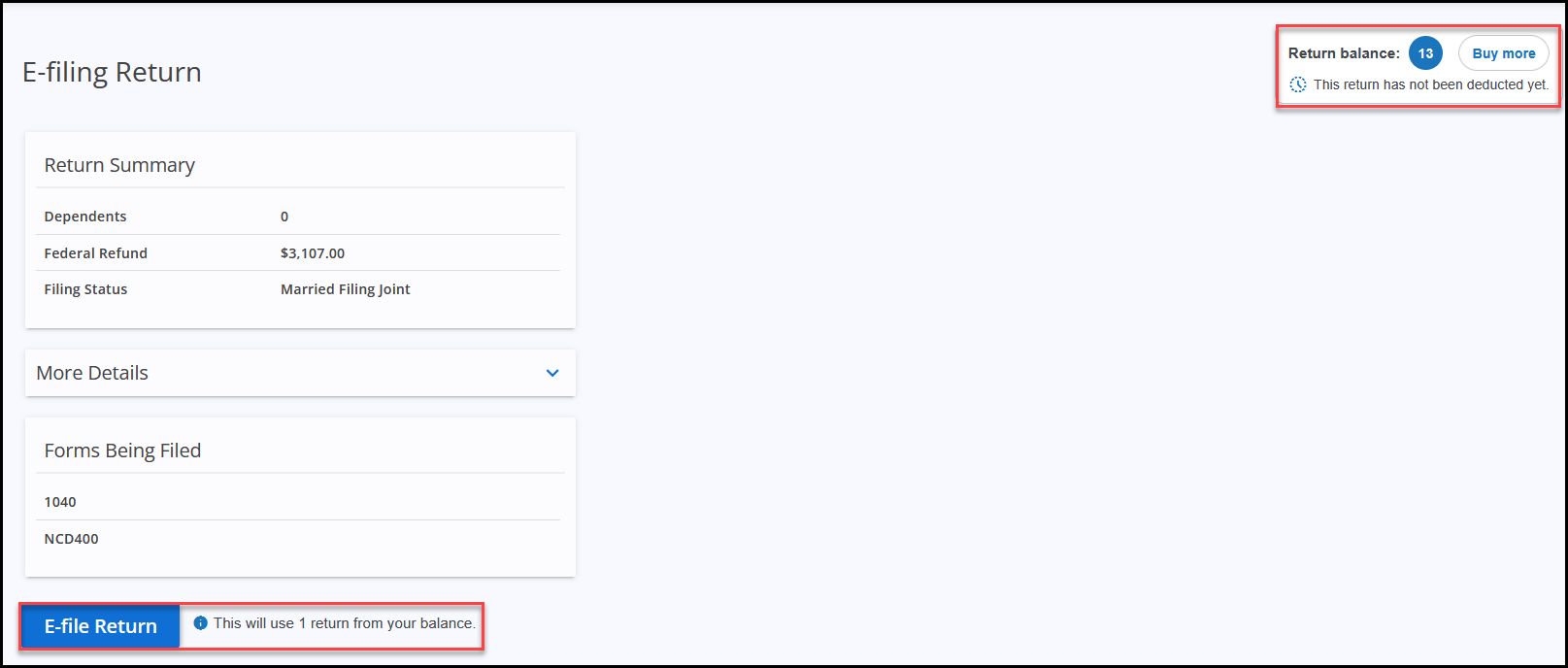
A return is counted and deducted from the return balance when the User:
-
e-files a return,
-
creates a return PDF with a Client Copy watermark,
-
creates a return PDF with a Preparer Copy watermark, or
-
creates a return PDF with no watermark (watermark option: None).
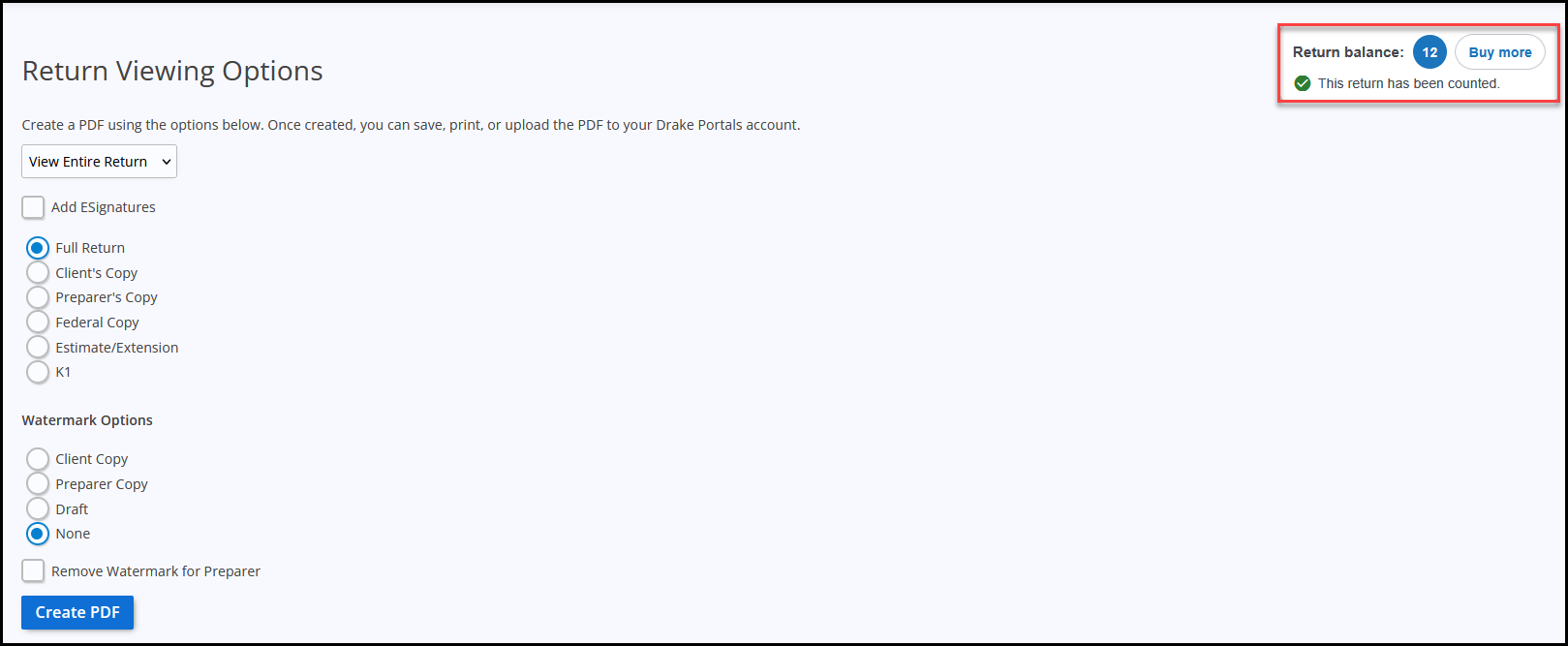
You can see if a return has been deducted from your return balance by clicking on View Return (at the top) or File (on the left).
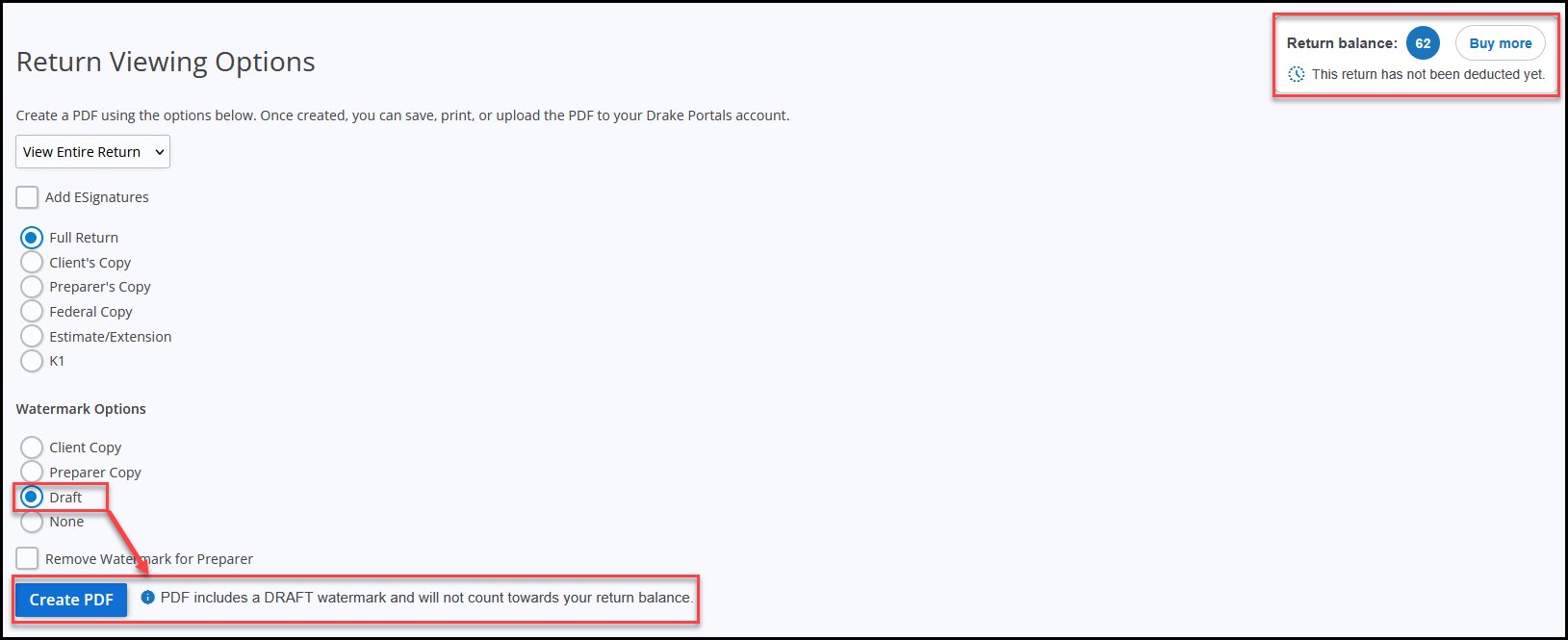
Note You can create a return PDF with a Draft watermark without counting the return against your return balance.
Not Yet Counted or Deducted
PDF without the Draft watermark selected:
e-Filing the return:
Draft watermark option selected:
Counted and Deducted
If you realize that you have entered the SSN/EIN incorrectly, you can change the SSN/EIN without it counting as another return until it has been e-filed and accepted.
-
Once a return is e-filed and accepted, an SSN/EIN change counts as another return.
-
If a return is e-filed and rejected, you can change the SSN/EIN, if needed, and resubmit without counting it as another return.
Note In 2024 and prior, a return is counted when a live return is created or when the SSN or EIN changes; however, 2024 contains an unlimited number of returns.
Test Returns vs. Live Returns
You can create test returns in DTO without counting that return against your return balance. See the “Test Return” section of Drake Tax Online - Creating a Return for details on how to create a test return. A test return is not counted against your return balance.
Important Only returns created through the Create test return function are treated as test returns. Entering any SSN/EIN using the standard Create return function creates a live return, even if the SSN/EIN itself is a test value. To avoid unintended charges, only use the Create test return function for testing or demonstration purposes.
Deleting a Return
Returns are counted against your bank of returns per the guidelines listed above. Once a return is counted against your bank of returns, it is considered used. Deleting the return does not refund it back to your bank of returns.
In short, deleting a return:
-
Removes the client data from your account
-
Does not restore or refund the counted/deducted return to your bank of returns
Tax Year Behavior
Returns are tied to the tax year for which they are purchased and cannot be rolled forward to a future tax year. Unused returns can only be used for the same tax year while the IRS allows e-filing for that year.
Returns:
-
Are tied to the specific tax year in which they are purchased
-
Cannot be transferred to another tax year
-
Do not roll forward
-
Cannot be applied to future-year software
The current tax year and previous four tax years are available (if purchased). For example, in the 2025 filing season, tax years 2025, 2024, 2023, 2022, and 2021 are available in the drop list.
If you are missing one of these years, you need to have your account admin add you as a preparer for that year. See Drake Tax Online - Setting Up Users and Preparers for details.
Important You must have an available bank of returns before you can create a PDF (print) or e-file any 2025 returns. 2021-2024 are included with an unlimited number of returns with your account access.
For information on updating returns from a prior year, see Drake Tax Online - Updating Returns from a Prior Year.
Bulk Purchases and Pricing
Drake Tax Online offers discounted per-return pricing when you purchase returns in larger quantities upfront. The more returns you purchase at one time, the lower the cost per return. Individual and business returns are priced separately. Returns can also be purchased as needed throughout the season at standard pricing.
For information about purchasing returns, see Drake Tax Online - Purchasing.
Frequently Asked Questions
No. Returns are tied to the tax year for which they are purchased and cannot be rolled forward to a future tax year. Unused returns can only be used for the same tax year while the IRS allows e-filing for that year.
See https://www.drakesoftware.com/products/drake-tax-online/ for pricing details.
Each tax year in Drake Tax Online has its own bank of individual and business returns. If there are no returns available in your bank for the selected year or return type, you will be prompted to purchase additional returns before you can create a PDF (print) or e-file.
See Drake Tax Online - Logging in and Using the Dashboard for details.
The current tax year and previous four tax years are available (if purchased). For example, in the 2025 filing season, tax years 2025, 2024, 2023, 2022, and 2021 are available in the drop list.
If you are missing one of these years, you need to have your account admin add you as a preparer for that year. See Drake Tax Online - Setting Up Users and Preparers for details.
Important You must have an available bank of returns before you can create a PDF (print) or e-file any 2025 returns. 2021-2024 are included with an unlimited number of returns with your account access.
For information on updating returns from a prior year, see Drake Tax Online - Updating Returns from a Prior Year.
In 2025 and future, you can change the SSN/EIN until the return has been e-filed and accepted.
-
If the return is rejected, you will be able to modify the SSN/EIN, if needed, and e-file again without counting it as another return.
-
If the return is e-filed and accepted, but you determine that the SSN/EIN needs to be changed, you will be prompted to count it as another return.
In 2024 and prior, returns are counted/deducted when created or when SSN/EIN information is modified, not when the return is filed; however, the 2024 bank contains an unlimited number of returns.
In 2025 and future, changing the SSN/EIN does not count/deduct another return unless it has been e-filed and accepted.
In 2024 and prior, when you change the SSN/EIN it is counted as a new return; however, the 2024 bank contains an unlimited number of returns.