Drake Tax - Online Reports - IRS Acceptance Alert
Article #: 18951
Last Updated: March 24, 2026

The IRS issued acceptance alerts in prior years; however, beginning with Tax Year 2025, the IRS has expanded their use. As a result, you may see acceptance alerts issued more frequently with accepted federal returns. In some situations that previously resulted in a rejection, the IRS will now accept the return and issue an alert instead.
Note This alert system is used for federal returns only.
These alerts provide important information regarding IRS processing updates and do not indicate a rejection. While the return is not rejected, the taxpayer may need to take action to address the situation identified in the alert.
Two common examples include:
-
Dependent Already Claimed - In prior years, if a dependent was claimed on more than one tax return, the later-filed return would generally be rejected. For Tax Year 2025, the IRS may accept the return and issue an alert indicating that the dependent has already been claimed on another return. If the taxpayer believes they are entitled to claim the dependent, they will need to work directly with the IRS regarding next steps or appeal procedures.
-
Paper Check Refund Delays - The IRS has indicated that paper refund checks may not be issued for a significant period of time after filing. An alert may be included to advise taxpayers of potential delays and to encourage providing banking information for direct deposit if they wish to receive their refund more quickly.
Report
To see the IRS acceptance alert for a return, follow these steps.
-
Log into the Drake Software Support website.
-
Click Reports and select Returns on the left-side menu.
-
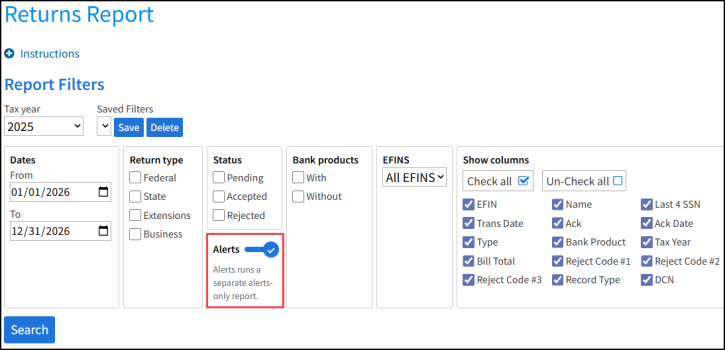
Toggle the Alerts option under the Report Filters.
-
Click Search.
-
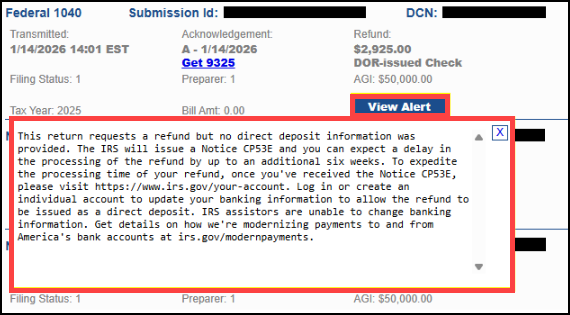
The IRS alert is displayed.
-
The following example shows a return that was accepted by the IRS, but did not include any direct deposit information. The recommended taxpayer action is included, if applicable.
-
Note The Alerts toggle is off by default. You must manually select it. When you select the Alerts filter, all other selections are automatically deselected. Filtering cannot be performed when running the Alerts-only report.