Drake Tax - 1120-S: Shareholder Ownership Changes
Article #: 10604
Last Updated: September 08, 2026

-
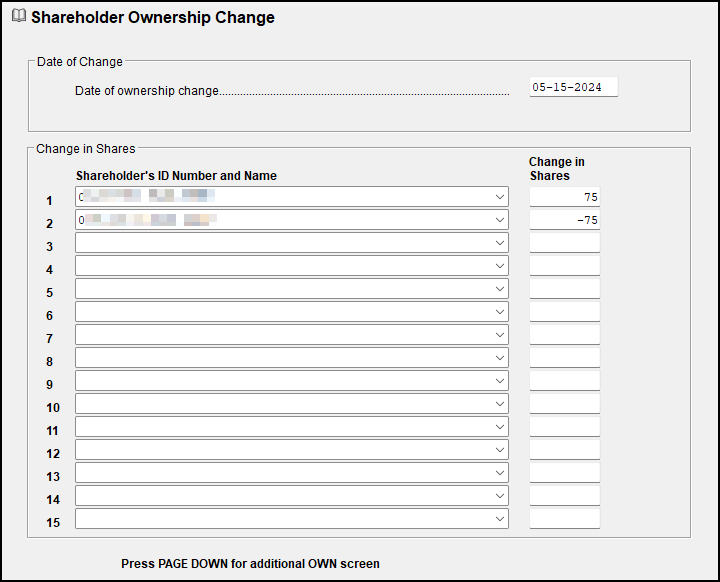
Open the OWN screen and enter the first date of exchange in the Date of Ownership Change field. The date entered must be within the tax year.
-
Select the shareholders involved in the exchange from the Shareholder's ID Number and Name drop list.
-
In the Change in Shares field, enter that shareholder's changes of ownership. Use negative numbers to reduce the shareholder's interest; use positive numbers to increase it.
-
Repeat Steps 2 and 3 for all shareholders involved in the exchange.
-
Calculate the return.
-
Review the results. In View/Print Mode, review
-
the K-1 Wks Own page for each shareholder to verify that the percentages are correct. Use the calculated percentage to confirm that the K-1 amount for the shareholder presents the appropriate amount of income, deductions, etc. (To do so, multiply the Schedule K amount for each line by the calculated percentage.)
-
the Wks SOWN share information for each shareholder to confirm the correct year-end number of shares owned for each shareholder.
Note On screen K1/K1E, the share change between Estates/Trusts will not be recognized if Name/Entity Name and Care of fields are missing. You may be prompted to return and verify the information before producing.
-
Notes:
-
The program calculates stock ownership changes for as many dates and exchanges as necessary. Press Page Down for a new screen for each date.
-
The sum of changes among multiple shareholders should net to zero, leaving the stock owned 100%, unless a shareholder received additional stock from the corporation, or returned stock (treasury stock) to the corporation. In that event, the exchange does not net to zero but the ownership is still 100%.
-
When an exchange involves more shareholders than one screen can hold, enter the same date in the new screen and continue selecting the shareholders involved. In this instance the individual OWN screens may not net to zero, but the entire exchange must net to zero.
-
The ending ownership amount may not equal the calculated ownership amount, as shown in this example:
-
Two shareholders each own 40 shares of an S corporation and a third owns 20 shares, to total 100 shares. The 20% shareholder decides to sell his interest to the other two shareholders on July 1. The two remaining shareholders' share of income, loss, deductions, etc., of the corporation is now 45% each for the year--not 50%. The 45% figure comes from the following equation:
-
(40% x 181 days/365 days) + (50% x 181 days/365 days)
The shareholder selling his interest will receive 10% of the S corporation's income, loss, deductions, etc., bringing the total allocation to 100%.
-
EF Message 0688 may generate if you attempt to override the ownership amounts for a shareholder to zero in a final year return. The sale of the shares is reported in the individual return. The number of shares that each shareholder owned each day of the tax year must be tracked in order to calculate the correct allocations. Per IRS guidelines, the number of shares owned on the last day of the tax year for the individual must be reported (not the number of shares outstanding after a shareholder leaves).