

Last Updated:
Article #: 15229
Configure Webroot
Webroot has the capability to allow certain files and prevent them from being quarantined. Drake recommends this process to make sure your updates within Drake Accounting are received smoothly.
-
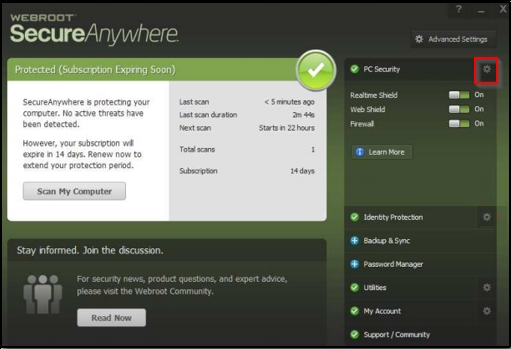
Open Webroot Security.
-
Click the gear next to PC Security:
-
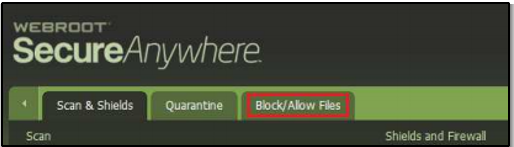
Select the Block/Allow Files tab:
-
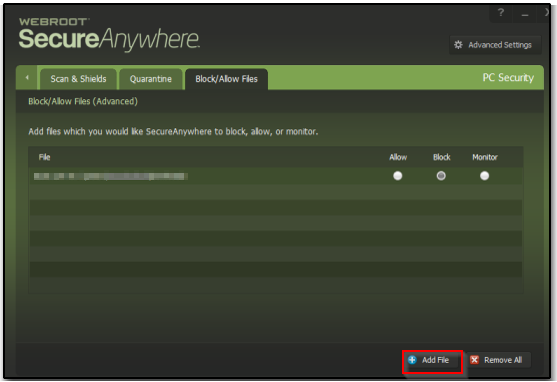
Click Add File at the bottom of the window:
-
Browse to the location of Drake Accounting (i.e. C:\).
-
Select the DrakeAccounting20YY folder and click Open.
-
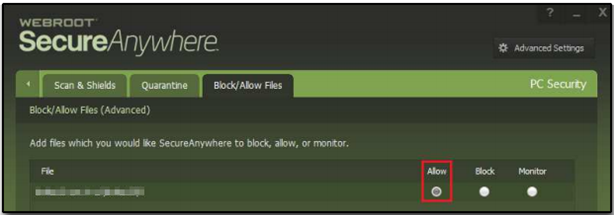
Verify that the Allow radio button is selected for that file:
-
Repeat the process for any other years of DAS, or other necessary files.