

Last Updated:
Article #: 19022
Using Drake SmartExtractTM (Beta), you can upload supported tax documents and import extracted tax data directly into a tax return. This helps streamline data entry by importing information from supported tax forms. This feature uses AI-assisted extraction to help reduce manual data entry from supported tax forms.
Drake SmartExtract (Beta) is available at no additional cost during the beta period for eligible Drake Tax users. See below for details.
Watch the video Drake Tax SmartExtract (Beta) for a demonstration.
Note Drake SmartExtract (Beta) is also available for Drake Tax Online Users – see Drake Tax Online – Drake SmartExtract (Beta) for details.
To begin using Drake SmartExtract (Beta), follow these steps:
- Open an individual (1040) tax return in Drake Tax 2025.
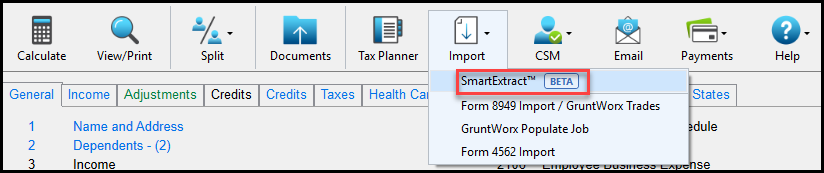
- Click Import > SmartExtractTM BETA.
- On the Pending Files tab, upload or select files.
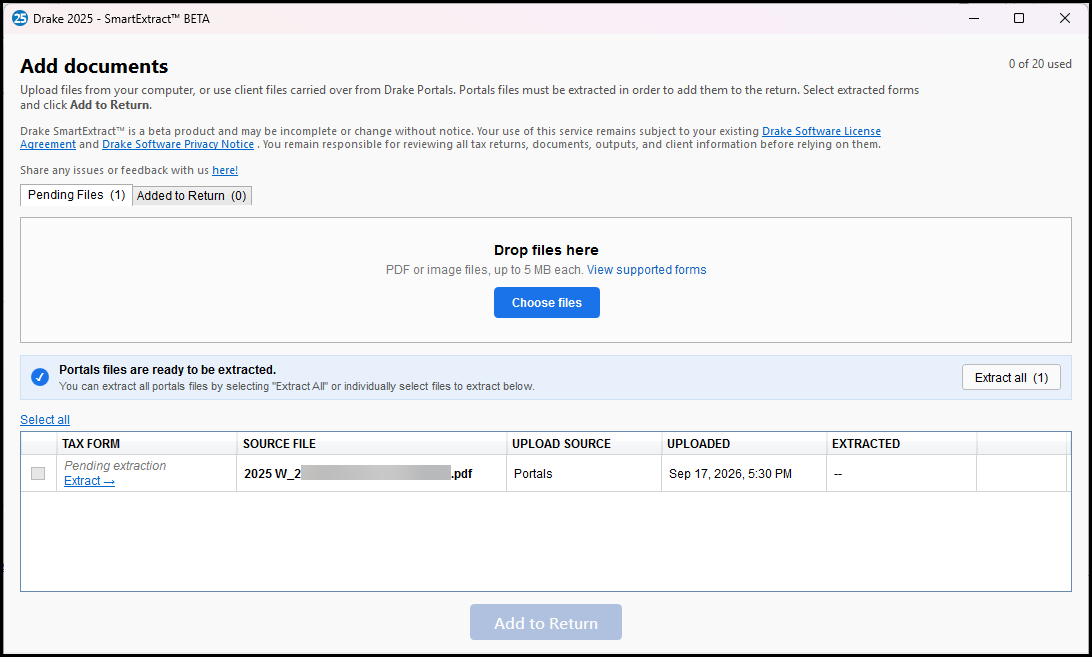
- Click Choose files and select documents from your computer. Each file will be reviewed and extracted. A progress bar will show to indicate the status.
- If there are files for this taxpayer in Drake Portals, click Extract all (#) to add them to the form list.
Note Extraction from Drake Portals, requires SSO to be enabled in Drake Tax Desktop. See Drake Tax – Hub Data Sync (Beta) and Drake Tax – SSO Login for details.
This does not remove files from Drake Portals.
- Supported file types include PDF and image files, up to 5 MB each.
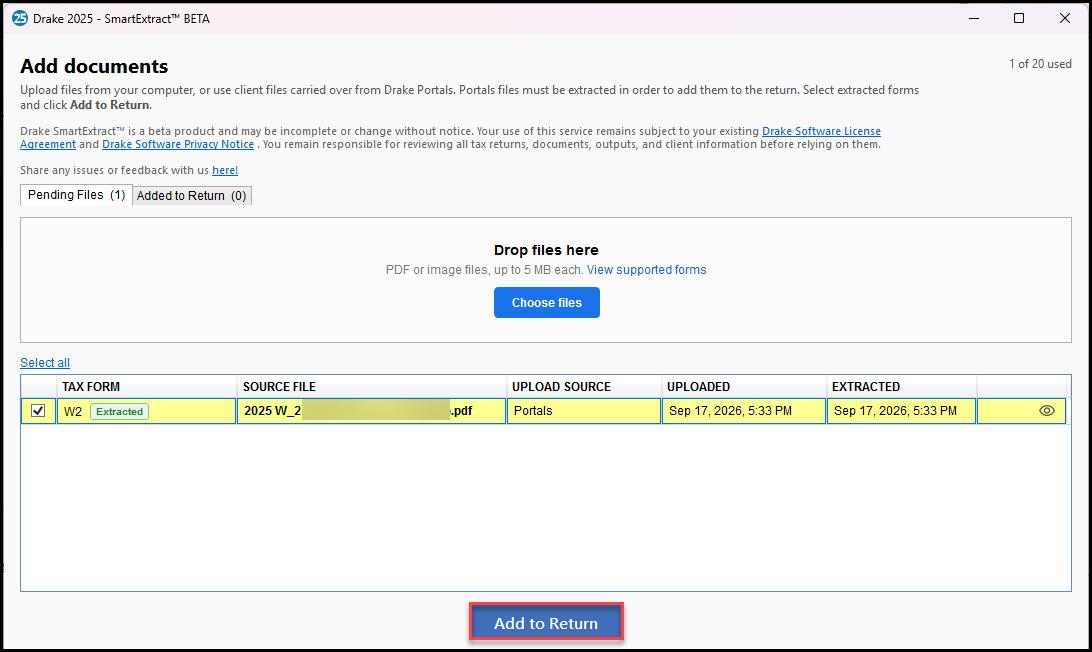
- The form list populates with documents that have been extracted (shows files manually uploaded/extracted and those that were extracted from Drake Portals).
- To proceed, select the check box beside the tax forms that you want to import, or click Select all, then click Add to return.
- On the Added to Return tab, review the summary of tax forms that were added. You can click on the eye icon to preview the form.
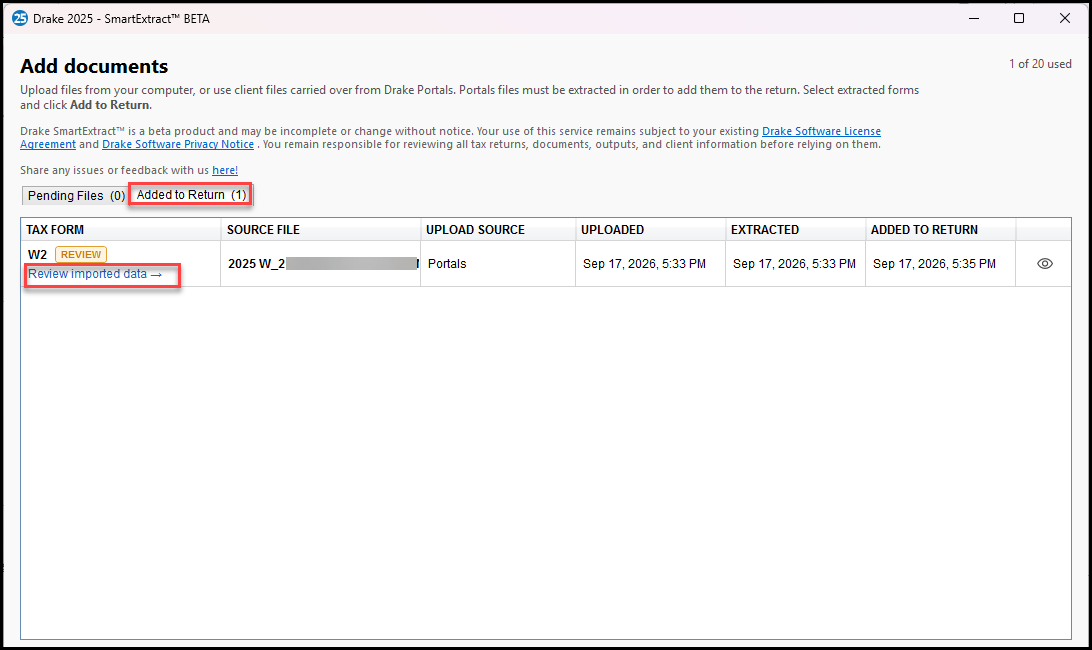
- Click Review imported data to open the corresponding data entry screen.
- Data entry is displayed on the left, and the original document is displayed on the right. Review them side-by-side to verify the imported data and make changes, if needed. Some additional selections may be required, such as choosing to whom the form belongs (TSJ box).
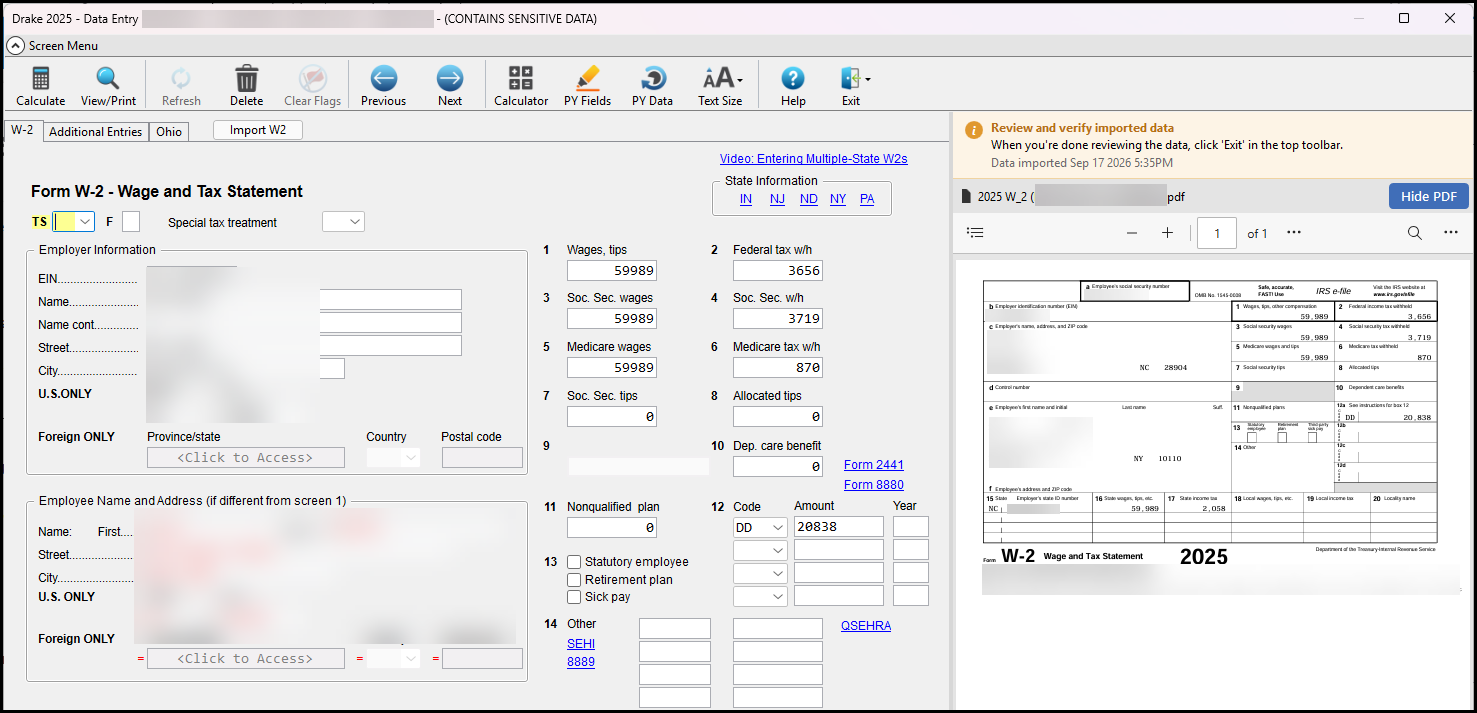
Tip You can hide the form PDF at any time by clicking the Hide PDF button above the document.
- When you have completed the review, click Exit or the X at the top of the window. The screen is saved automatically.
- Repeat the review for each form that was imported.
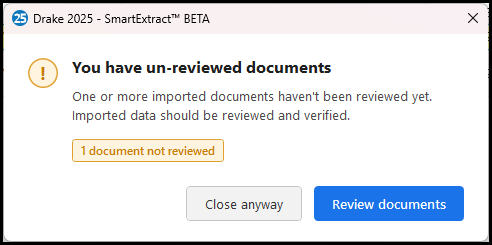
Important Imported data should always be reviewed and verified for accuracy before the return is filed. If you attempt to close the Drake SmartExtract window prior to reviewing all imported forms you will see a message page. Click Review documents to return to the review page. Click Close anyway to leave the Drake SmartExtract window.
Frequently Asked Questions
How can I get support for Drake SmartExtract (Beta)?
Contact our Drake Software team at (828) 524-8020 for assistance.
What is Drake SmartExtract (Beta)?
Drake SmartExtract (Beta) is an AI-assisted tool that extracts information from supported tax source documents and organizes it for use during return preparation.
Are JPG or image files supported for extraction and import?
Yes. You can upload an image of a supported tax form, and the information will be extracted and imported where possible.
What forms and schedules can be imported?
The following forms are supported in this beta release:
- Form W-2
- Form 1098
- Form 1099-B
- Form 1099-DIV
- Form 1099-DA
- Form 1099-INT
- Form 1099-K
- Form 1099-MISC
- Form 1099-NEC
- Form 1099-R
- Consolidated Form 1099 (for 1099-DIV, 1099-INT, and 1099-B)
- Schedule K-1 (Form 1065)
Can I upload multiple documents at once?
Yes. You can upload multiple files in a single operation. Each supported tax form is extracted and added to the return separately.
Is there a limit to how many documents can be extracted?
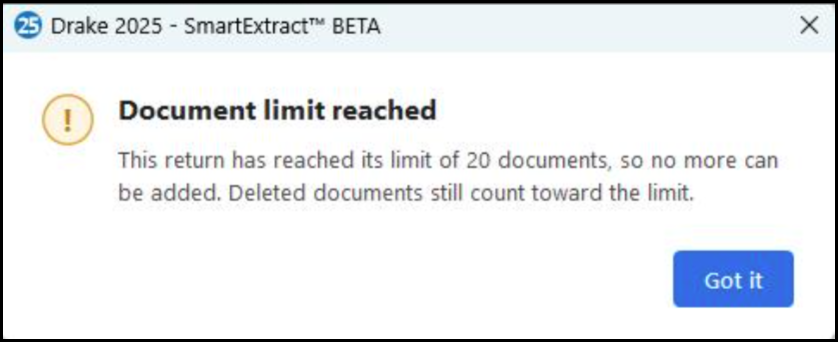
Yes, there is a limit of 20 documents. The document count is shown on the SmartExtract window.

You will see the following notice when your limit has been reached:
What file types are supported?
You can upload PDF and image files, including JPEG, JPG, and PNG files. The maximum file size is 5 MB each.
What happens if I upload a form that is not supported?
If the form is not supported, an exception message will be displayed, and the information will not be imported into the return. You must enter that information manually, if applicable.
Can I delete imported forms?
Yes, you can delete or edit imported data, if needed. Simply open the regular data entry screen for the form that was imported.
Does the tool automatically file returns?
No. Drake SmartExtract does not file returns. Users should review and verify extracted information before using it in the return preparation process.
Is there any cost to use the beta?
No, the beta is available at no cost during the beta period for eligible Drake Tax users.
How much will it cost to use Drake SmartExtract after the beta?
Drake SmartExtract is sold on a prepaid, per-return basis. Bulk discounts are available:
| Number of Returns | Price Per Return |
|---|---|
| 1 to 9 | $5.00 |
| 10 to 24 | $3.50 |
| 25 to 49 | $2.50 |
| 50 to 99 | $2.00 |
| 100+ | $1.50 |
Note:
- Example: Purchase 100 returns for $150.00, or 145 returns for $217.50.
- The free beta period runs through December 31, 2026.
- Additional information, and the ability to purchase, will be available in December 2026.
- SmartExtract purchases made on or before April 30, 2027, expire on December 31, 2027, if not used. Unused purchases made after April 30, 2027, expire on December 31, 2028.
Is this feature available for 2024 returns?
No. Drake SmartExtract (Beta) is currently available only for 2025 returns in Drake Tax.
In what return types can Drake SmartExtract (Beta) be used?
Drake SmartExtract (Beta) is currently available only for 1040 returns.
Future enhancements may expand this capability.