

Last Updated:
Article #: 16957
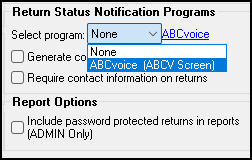
EF message 5107 appears if the ABCV screen was filled out without a Return Status Notification program selected in the software’s settings. To select a Return Status Notification Program, go to Setup > Options > Administrative Options and select the appropriate choice from the drop list.
If you did not want to fill out the ABCV screen, go to the Miscellaneous tab in Data Entry and open the ABCV screen. Press Ctrl + D on the keyboard to delete the screen.