

Last Updated:
Article #: 19040
Overview
Assistant (Beta) is an AI-powered tool available in Drake Tax Desktop. Assistant can answer questions about Drake Tax and tax-related topics, explain e-file rejects and diagnostic messages, and suggest steps for resolving issues.
Assistant uses information about the currently open return to provide relevant guidance. The following return types are supported:
- 1040
- 1065
- 1120
- 1120-S
- 1041
- 990
Assistant provides guidance only. Tax return preparers are responsible for reviewing all information and verifying the accuracy of their returns. Assistant does not provide final tax or legal advice, certify return accuracy, automatically file or retransmit returns, or replace preparer judgment.
Enabling Assistant (Beta)
Assistant is an optional beta feature that must be activated by each user.
To activate Assistant:
- Open Drake Tax and access a return.
- Toggle on the option Try Assistant (Beta).
- Review the informational panel.
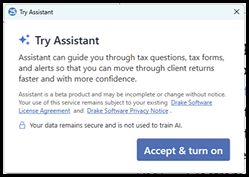
- Select Accept & turn on to activate Assistant.
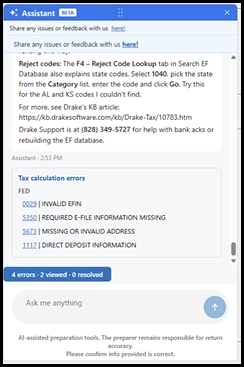
- The Assistant panel opens in Drake Tax.
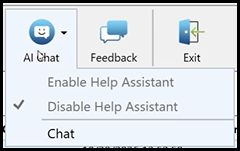
Users who do not activate Assistant will retain access to the existing Help Assistant experience. Assistant and Help Assistant cannot be used simultaneously during the beta. You will see the Enable and Disable options grayed out on the Chat menu. You can click Chat to open the Help Assistant in a new browser window.
Asking Assistant a Question
Enter a question in the Assistant panel or select one of the suggested prompts.
Assistant can provide guidance on the following topics:
- Drake Tax functionality and data entry
- Tax forms and filing requirements
- Federal and state e-file rejects
- EF Messages and diagnostic messages
- IRS publications and guidance
For example, you can ask:
- What does this rejection code mean?
- What should I review to resolve this diagnostic?
- How do I enter a Schedule K-1 in Drake Tax?
- Where can I find more information about this IRS form?
You can also ask follow-up questions to obtain additional information or clarification. The conversation remains available as you move between data entry screens.
Reviewing Errors and Rejects
After calculating a return, use Assistant to review errors and reject messages associated with the currently open return.
When multiple issues are present, Assistant can:
- Group federal and state issues by jurisdiction, listing federal issues first
- Prioritize errors that prevent e-filing
- Explain messages in plain language
- Suggest screens, fields, or entries to review
- Answer follow-up questions about individual issues
- Skip an issue and proceed to the next when instructed
Assistant provides suggested troubleshooting steps but does not automatically correct errors or modify return data.
Review the original EF Message, diagnostic, or reject and verify any suggested changes before filing the return.
Managing the Assistant Window
The Assistant window can be moved within the Drake Tax data entry screens. The window retains its position and remains available as you navigate between screens.
- You can close the window by clicking on the X at the top right of the Assistant window.
- Click on the Assistant bubble to reopen the window:

To deactivate Assistant, toggle off the option Try Assistant (Beta) in data entry. This turns off the Assistant for all returns.
Frequently Asked Questions
Does Assistant have access to the entire return?
No. Assistant uses context from the currently open return, but the initial beta does not support reading individual field values directly from the return.
Can Assistant enter or change information on a return?
No. Assistant can suggest entries or screens to review but cannot enter or modify return information. Automatic data entry, field highlighting, and screen-level navigation are not included in the initial beta.
Can Assistant help with federal and state errors?
Yes. Assistant supports federal and state errors and can organize messages by jurisdiction, with federal issues listed first.
Can Assistant and Help Assistant be used at the same time?
No. During the beta, users can activate either Assistant or Help Assistant, but not both simultaneously. You can still use the Help Assistant (click AI Chat > Chat), but it will open in a different browser window. See Help Assistant and Chat Support for details.
Is my information used to train AI?
No. User data is not used to train AI.
What if Assistant provides an uncertain or incomplete response?
Assistant is designed to indicate when it is uncertain. Verify its guidance against the return, the original diagnostic or reject message, and applicable tax guidance.
How do I contact Drake Software Support?
For additional assistance, contact Drake Software Support at (828) 524-8020.