

Last Updated:
Article #: 16240
There are several options that you can use when reconciling your bank transactions. These are located on the right side of the screen under Accounting > Bank Reconciliation:
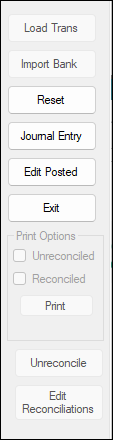
Load Trans – Loads all unreconciled transactions for the selected account through the Statement Date on the left side. Once the transactions have been loaded, the Load Trans button will become the Finish button.
Import Bank – Allows you to import a bank statement that is in .CSV format.
Reset – Clears all entries.
Journal Entry – Switches the window to journals so you can add, edit, and delete unposted transactions.
Edit Posted – Switches the window to journals so you can add, edit, and delete posted transactions.
Exit – Exits the reconciliation window without finalizing. If there is a reconciliation in progress, a pop-up window will display asking if you would like to save your partial reconciliation before leaving the window. If you return to the Bank Reconciliation window and choose the same account later, a different pop-up will ask if you want to continue.
Note You must complete one reconciliation on an account before another one can be started.
Print Options:
-
Unreconciled – On the printed report, this option will limit the display to only un-reconciled transactions.
-
Reconciled – On the printed report, this option will limit the display to only reconciled transactions.
-
Print – This option will allow you to preview the bank reconciliation report without closing out the edit window. You can close the report and continue to make edits as needed. Uncheck this option when you are ready to finalize and finish the reconciliation process.
Note You can select any combination of these three options, but at least one option must be chosen before you can choose the Finish button.
Unreconciling Transactions
You can “unreconcile” transactions that have already been reconciled through a bank reconciliation. Essentially, it will move the transactions that you unreconciled from the Bank Report (right) to the Book Report (left). These transactions are then available to be reconciled once again through a bank reconciliation.
To unreconcile transactions:
-
Go to Accounting > Bank Reconciliation.
-
Select the account that has the transactions you wish to unreconcile.
-
Click Unreconcile on the right.
-
Select the transaction(s) by clicking in the blank box to the left.
-
Click Unreconcile.
-
If needed, start another bank reconciliation to see the transactions on the Book Report (left).
Edit Reconciliations – Allows you to edit or delete reconciliations that were previously saved for the active account.
See Bank Reconciliation for a video demonstration.