

Last Updated:
Article #: 13167
DCN
Important A DCN (Declaration Control Number) is no longer necessary for electronic filing of an individual return, but you can still use it locally for reports and for keeping track of returns in your own office.
There is no longer any need to set starting DCN numbers on the Firm screen unless these two conditions both apply:
- You are using DCNs in your office locally for reports and return tracking
- and you have the same firm (with the same EFIN) set up either
- on more than one standalone computer,
- or on a secondary (peer-to-peer) network where Share Settings (Setup > Data Locations) is not selected,
If both conditions apply, you will want to avoid duplication of DCNs in your own records by setting your firms’ starting DCN serial numbers (Setup > Firms > Settings tab > DCN serial number) sufficiently far apart that they will not overlap as you create new returns during the season. When there are multiple computers creating returns for the same EFIN, the DCN should be offset on each computer by more than the maximum number of returns created on any computer.
Each time a new return is created, the DCN for the associated firm is incremented. Duplicate DCNs occur after the DCN for a firm on one computer is incremented and enters the range of DCNs for the same firm (with the same EFIN) on another computer. The DCNs of firms with different EFINs are never the same because a firm’s EFIN is part of its DCN.
Prior to the 2014 filing season, the DCN was used by the IRS as a return identification number for individual returns. IRS discontinued that use in 2014 in favor of a Submission ID number (SID), so the DCN is no longer necessary for e-filing.
Between returns, the entire DCN increments by 10, because the last digit represents the year and does not change. The DCN Serial Number field on the Firm Setup screen (Setup > Firms) increments singly. The five-digit number you see in that field is the five digits you see to the immediate left of the last digit (the year) in the DCN.
The DCN
- is available as a filter in Reports > Report Manager
- is displayed on Form 9325, Acknowledgment and General Information for Taxpayers Who File Returns Electronically when a 4868 is transmitted ONLY.
- Can be displayed in the Client Status Manager by customizing the headers to include a DCN column.
Business Returns
Business returns do not have a Declaration Control Number (DCN). When you configure either Client Status Manager or Personal Status Manager to display the DCN column, a business return may display a number there. However, the number displayed is not a DCN, but a software artifact that has no significance, other than the firm EFIN that it includes.
That number does not change if you attempt to reset a business return’s DCN. Although you can open a business return, run the CTRL + M hot key shortcut, and receive a confirmation, there is no effect because there is no DCN to reset.
Staggering DCNs
Each computer assigns a Declaration Control Number (DCN) to every calculated return. Although the IRS no longer uses DCNs, Drake Tax still tracks returns by these numbers, and duplicating DCNs can lead to problems for “peer-to-peer” setups and offices where multiple non-networked computers are running Drake Tax.
Returns in Drake Tax are assigned a DCN in sequential order, starting with 01001 (for instance, 01001, 01002, 01003, etc.). If an office is not networked and uses multiple workstations for data entry, each workstation must adjust (“stagger”) its DCN counter.
Important Stagger the starting DCNs before creating returns.
To stagger the DCNs, complete the following steps on each workstation:
- From the menu bar of the Home window in Drake Tax, go to Setup > Firms.
- Double-click the firm, or select it and click Edit Firm. The bottom half of Firm Setup becomes active.
- Click the Settings tab
- Change the DCN serial number. Drake Tax suggests choosing starting DCNs that are at least 2,000 numbers apart.
- Click Save to save changes, or click Cancel to exit without saving changes.
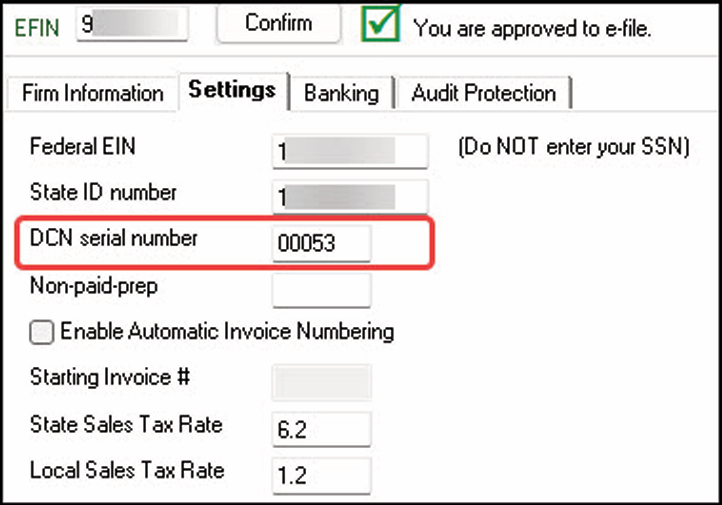
Depending on the amount chosen to stagger the numbers, each workstation now produces DCNs based on a different starting number. For example, if you chose to stagger by 2,000 with the first computer starting at 01000, the second computer would start at 03000, the third at 05000, and so on. In this case, each computer can process 2,000 returns before duplicating a DCN.
Important Be careful if changing DCNs after tax season begins and returns have already been transmitted. If DCN staggering is done improperly, your ability to receive acks and your EF database could be adversely affected.