Drake Portals - Drake E-Sign Online - E-Signature Event Types
Article #: 18974
Last Updated: August 04, 2026

Drake E-Sign Online offers two different types of E-Signature Events: Basic E-Signature Events and KBA E-Signature Events.
-
Basic E-Signature Events can be used for PDFs that do not include Form 8878 or 8879.
-
KBA E-Signature Events are required for PDFs that contain Form 8878 or 8879, according to IRS guidelines.
These event types differ in both functionality and pricing and are not interchangeable. If you exhaust one type, you must purchase additional events of that same type to continue using that option.
The pricing below applies to customers who have purchased Drake E-Signature Events but are not enrolled in a Practice Essentials Bundle.
Basic E-Signature Events
-
1 to 99: $1.25 per event
-
100 to 499: $1.00 per event
-
500+: $0.50 per event
Important Beginning with Drake Tax 2025, Basic E-Signature Events may be used for PDFs that do not include Form 8878 or 8879.
For Drake Tax 2024 and prior, all remote signature requests will continue to use a KBA E-Signature Event, regardless of whether the PDF includes Form 8878 or 8879.
KBA E-Signature Events
-
1 to 99: $2.50 per event
-
100 to 499: $2.25 per event
-
500+: $1.75 per event
E-Signature Event Bank
To see how many E-Signature Events you have available, follow these steps:
-
Log into your Drake Portals account online.
-
On the left, click Account Settings.
-
The bank balance for each E-Signature Event type is displayed on the Account tab under Account Information.
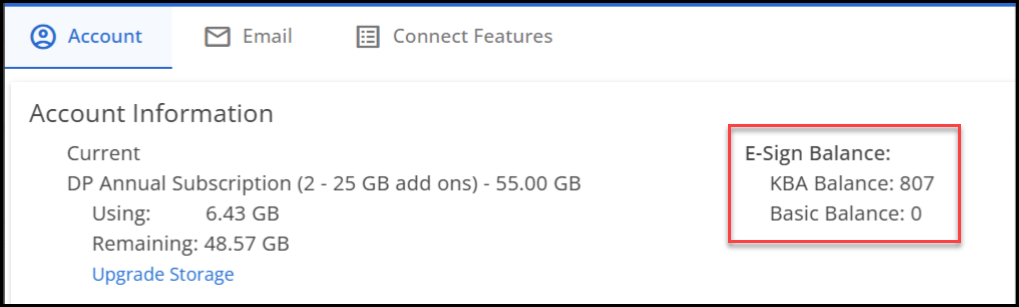
Note Your E-Signature Event balance is also displayed when you click the eSign button in view mode of a return.
Event Usage
-
Each E-Signature Event allows for capture of all the signatures in a single PDF. This can include multiple pages with signature fields, and taxpayer/spouse signatures that occur in that PDF.
-
Every additional PDF that needs to be signed will use an E-Signature Event.
-
If a document is not included in the PDF, but later needs to be signed, that second signature document will require another E-Signature Events.
Purchase Additional
To purchase additional E-Signature Events, log into the Drake Software Support website and go to Products > E-Sign. Enter the number of E-Signature Events that you would like to purchase and click Buy Now.
Note Minimum purchase amount requirements apply.
Prior Purchases
Any E-Signature Events purchased prior to April 17, 2026, are KBA E-Signature Events.
Starting on April 17, 2026, you will need to select the E-Signature Event type when purchasing, as detailed above.
Expiration
E-Signature Events expire at the end of the year following the filing season for which they were purchased.
-
Purchases from May 1, 2026, through April 30, 2027, expire December 31, 2027.
-
Purchases from May 1, 2027, through April 30, 2028, expire December 31, 2028.
Important Any E-Signature Events purchased prior to May 1, 2026, expire December 31, 2027.
Signing Process
Use of Drake E-Sign Online varies depending on which Drake Software product you are using to initiate the signature process. See the following articles for detailed steps:
Note Drake Tax 2024 and prior will only support the older version of E-Signature Events - KBA E-Signature Events. Basic E-Signature Events will not be available in prior years of Drake Tax.
Practice Essentials
If you have purchased a Practice Essentials Bundles, a number of E-Signature Events are included with your subscription. See Practice Essentials for more information.