Drake Tax - Home Menu
Article #: 13781
Last Updated: May 04, 2026

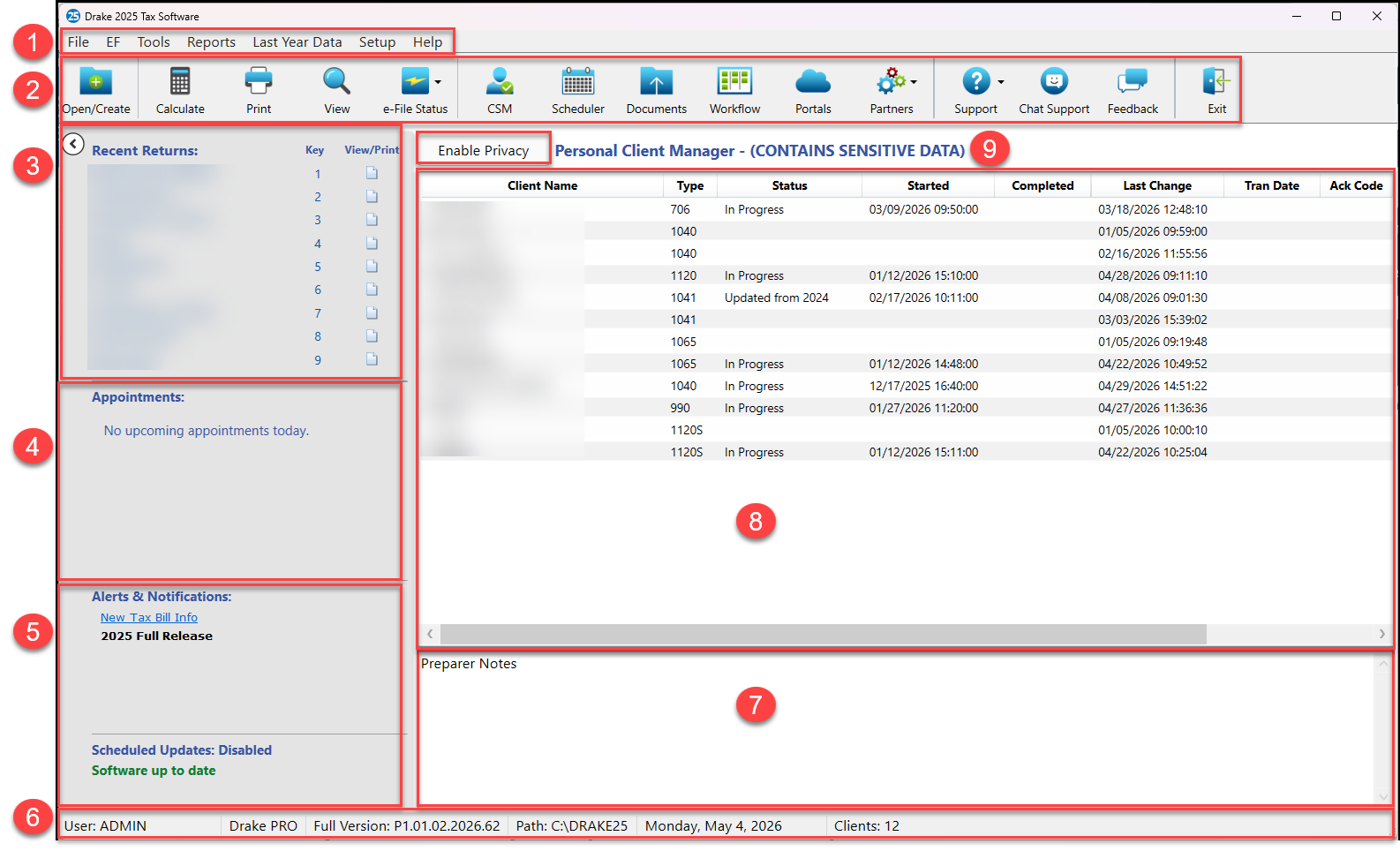
The Home Window features includes the following sections:
-
Menu Bar - Allows you to complete various tasks in the program.
-
Toolbar - Allows you to complete various tasks in the program.
-
Open/Create - open existing returns or create new returns. See Drake Tax - Creating a New Return for details.
-
Calculate - Launches batch calculate function. See Drake Tax - Batch Calculation for details.
-
Print - Launches batch print function.
-
View - Launches batch view function.
-
e-File Status - See KB 10783 for details.
-
CSM - See Drake Tax - CSM - Frequently Asked Questions for details.
-
Scheduler - See Drake Scheduler - Overview for details.
-
Documents - See Drake Documents - Functions, Setup, and Technical Requirements for details.
-
Workflow - See Drake Workflow - Overview and Frequently Asked Questions for details.
-
Portals - See Drake Portals - Overview and Pricing for details.
-
Partners:
-
Support - Contacting Drake Software Support
-
Chat Support - Chat Support
-
Feedback - Complete a feedback survey to provide your feedback directly to Drake Software.
-
Exit - Close the program.
-
-
Recent Returns - Lists the last nine returns that were opened by the logged-in preparer.
-
Appointments - Shows the logged-in preparer’s schedule for the current date (per the Drake Scheduler), and provides a link to open the Drake Scheduler.
-
Alerts, Notifications, and Update Status
-
Indicates when e-file (EF) acknowledgments are ready to be processed, the status of GruntWorx jobs, (such as pending or completed); important announcements, dates, and reminders, and informs you of Drake Software systems statuses.
-
Your system must be connected to the Internet to receive alerts; alerts are refreshed every 15 minutes.
-
The Update section keeps you informed of program updates available to be installed. If all available updates have been installed, the status is listed as Software up to date.
-
-
Status Bar - Provides system information about the logged-in preparer, program version, computer drive, and date
-
Preparer Notes - Allows you to write brief notes—visible only to the preparer who wrote them—that remain in this section until deleted
-
Personal Client Manager (PCM) - Allows the logged-in preparer to easily manage client records, which can be sorted by name, return type, status, transmission date, and more. See Drake Tax - Personal Client Manager Overview for details.
-
Enable Privacy - Hides the Recent Returns list, PCM, and Preparer Notes sections. Toggle back to full visibility on the Home window by clicking the Disable Privacy button.