

Last Updated:
Article #: 18467
Use the Help Assistant to quickly get answers to common and trending Drake Software questions 24/7.
Simply type your question in plain language, and the Help Assistant will reply with guidance based on Drake Software’s documentation. In some cases, you will be asked clarifying questions before being provided with a more detailed response. If there is a related Knowledge Base article, the Help Assistant will share a link that you can follow for additional details.
The Help Assistant is available in the following locations:
-
inside Drake Tax
-
as a floating Drake Tax Chat bubble (if enabled – see Chat Bubble),
-
under Support > Help Assistant (opens in an external browser),
-
-
inside Drake Accounting (on the main menu),
-
on the Drake Software Knowledge Base (you’re here!).
Live Support
If you need more help, you can ask to be connected to a Support Agent (during available hours). You will be prompted to click Chat with us and enter additional information (your name and account number) before being transferred. The chat will notify you when you are connected with the live agent and you can proceed with your conversation.
Survey
At the end of your session, be sure to take a survey and let us know how it went!
Chat Bubble
Enable
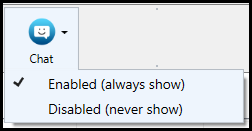
To enable the Help Assistant/Live Chat bubble in Drake Tax or Drake Accounting, click on the Chat icon on the home window and choose Enabled (always show).
This will show a blue chat icon on your Drake Tax window or a green icon on your Drake Accounting window. Click on the chat icon to expand the chat window.


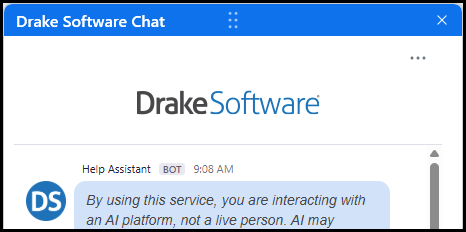
Tip You can drag the bubble or chat window to another location on your screen, as needed.
You will configure this setting in Drake Tax and Drake Accounting separately.
Disable
If you prefer not to have the chat bubble displayed in your program, click the Chat icon on the Home window and choose Disabled (never show). To turn the chat bubble back on, click the Chat icon again and choose Enabled (always show).
In Drake Tax, you can also access the Help Assistant or Live Chat by selecting Support > Help Assistant. This opens the Help Assistant in your default web browser and does not turn the chat bubble back on in Drake Tax.
In Drake Accounting, click the chat icon (not the drop list) to launch the Help Assistant in your default web browser without turning the chat bubble back on in Drake Accounting.