

Last Updated:
Article #: 18426
If you have purchased a license for Adobe Acrobat Pro, you can use that license your Rightworks desktop. To use your existing license in Rightworks:
-
Launch the Adobe icon from your Rightworks desktop.
-
Click Sign in.
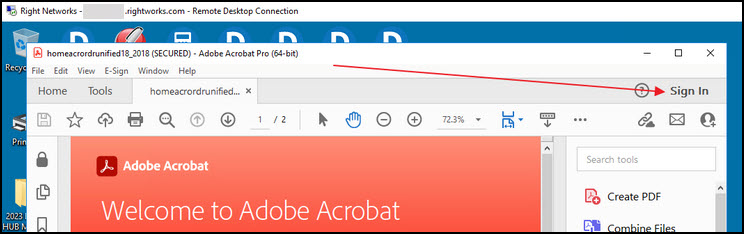
-
Enter your Adobe account credentials.
For steps on making this your default PDF program, see Rightworks – Change Default PDF Viewer.
Tip If you do not have an Adobe icon on your Rightworks desktop, contact Drake Software Support at (828) 349-5556 for assistance.
Supported Subscriptions
Rightworks supports the following Adobe subscriptions only:
-
Acrobat Reader
-
Acrobat Standard
-
Acrobat Pro
-
Acrobat for Teams
-
Creative Cloud All Apps
Note Your Adobe license must include the Adobe Document Cloud (Adobe DC) to be compatible with Rightworks. Contact Adobe with any questions about your license.