

Last Updated:
Article #: 15843
PAUI needs to be setup to ensure the correct calculation of forms UC-2 and UC-2A. In setting up PAUI, you will make entries at:
-
Firm > Rates & Withholding Setup > State Setup
-
Employees > Deduction & Benefits > Deductions tab
-
Employees > Employee Setup > Deductions tab
Note The PA UC-2 and UC-2A cannot be saved unless the PA Unemployment ID has been entered in correct format (for example, 12-3456) at Client > Edit > Contact Information tab.
-
Go to Firm > Rates & Withholding Setup > State Setup > Select PA on the left.
-
Enter the employee contribution rate in the Employee Withholding field.
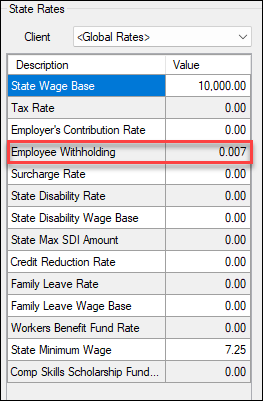
Important Amount used above is only for demonstration.
-
Click Save.
-
Go to Employees > Deduction & Benefits.
-
Set up a PAUI deduction.
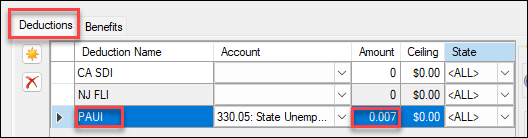
Important Do not use a withholding Code.
-
Click Save.
-
Go to Employees > Employee setup.
-
Select the applicable employee.
-
Go to the Deductions tab and click on PAUI under Available Deduction Name (on the left).
-
Click the right arrow (
 ) to transfer to the Employee Deduction Name (on the right).
 -
Click Save.

These entries will include the PAUI deduction when you prepare and print payroll.
The PAUI information also will be carried to PA Form UC-2, line 3 (Employee Withholding Rate (.0007 used in this example) x Gross Wages (865.38 in Box 2) = Employee Contributions).