

Last Updated:
Article #: 15082
In Drake Accounting, you have the option to use Department of Labor rules to calculate payroll. This feature is turned on by default. Go to Employees > Options > Use US DOL Rules to Calculate Payroll on the Payroll Options tab to toggle this setting.
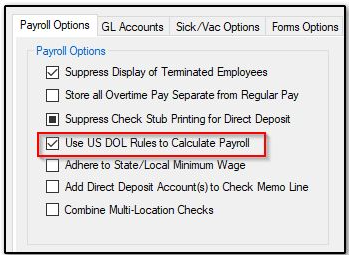
If you have the check box selected for Use US DOL Rules to Calculate Payroll, the software will automatically force the federal minimum wage and overtime if:
-
The employee is getting paid less than the federal minimum wage.
-
The employees overtime factor is less than the federal overtime.
The software will prevent you from entering a pay rate and overtime less than the DOL rules if this check box has been selected. It produces an error stating the overtime for non-tipped hourly employee has to be at least equal to the Federal Minimum Wage, forcing you to make adjustments before you can save the screen.
Note See the U.S. Department of Labor website for more information about the minimum wage and overtime calculation method.