
Last Updated:
Article #: 17563
Starting with tax year 2021, the IRS has expanded Form 1116 to include a Schedule B. This new schedule is used to “reconcile [the taxpayer’s] prior year foreign tax carryover with [their] current year foreign tax carryover.” Use the steps below to generate Schedule B. Follow the guidelines below.
Suppressing Form 1116
By default, Form 1116 is generated with the return if data is entered for Foreign tax paid and the Form 1116/FTC Information section is completed. If these fields include data but 1) Form 1116 is not required, and 2) the taxpayer is making the election to not file Form 1116 and still claim the credit, select 1116 NOT required. For more information on making this election, refer to the Form 1116 instructions.
For more on Form 1116 in Drake Tax, see “Foreign Tax Credit” on page 104. Marking the 1116 NOT required check box suppresses the Form 1116 in its entirety (in other words, for all income items entered on screens DIV and INT).
Note There is a global option available under Setup > Options > Calculation & View/Print > Elect to Claim FTC without filing Form 1116 when possible. When this is marked, Form 1116 may not be generated if the taxpayer meets the requirements. This also prevents the Form 1116 Schedule B from producing and no carryforward amounts are allowed. See Drake Tax – 1116: Frequently Asked Questions.
An override for the global option may be found on the ELEC screen.
Prior-year carryforwards flow directly from Schedule B in total to Form 1116, Part III, Line 10. Carryforwards to next year flow to Wks Carry.
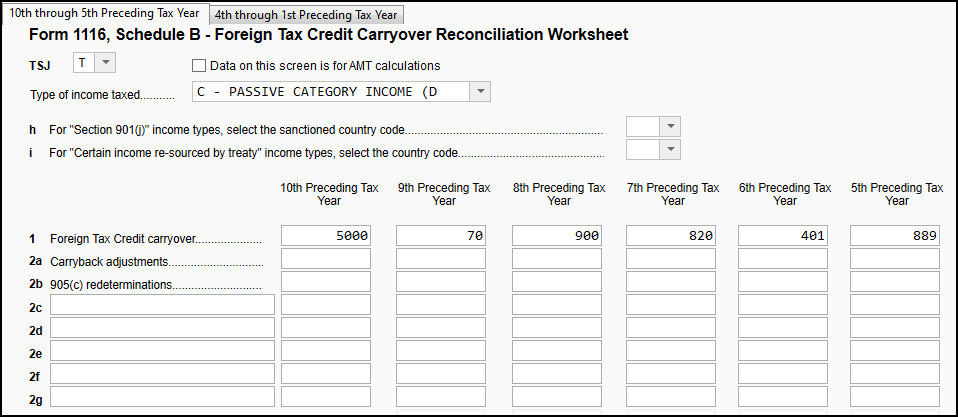
To enter FTC carryovers, first, create Form 1116 to report any current year foreign income and/or tax paid or accrued by entering applicable data on the DIV, INT, or 1116 screens.* Then, click the blue link 1116 Sch B Foreign Tax Carryovers on the 1116 screen. On the 116B screen, enter the details for the type of income taxed and carryover information for the 10th-5th preceding years on the first tab, and then the 4th through 1st preceding years on the second tab.
-
If the Foreign Tax Credit Carryover is subject to regular tax and AMT, you will need to enter a separate screen (Page Down) reporting the numbers on each. The check box Numbers on this screen are for AMT calculations on the carryover screen that is for AMT.
-
A separate screen will need to be created to report carryovers for each type of income taxed. It is very important that the Type of income taxed drop lists on the 1116 and 1116B screens match. Return Note 845 generates if you enter more than one screen 116B per income type entered on screen 1116.
In View/Print mode, Form 1116 Sch B and Form 1116 Sch B pg 2 are generated to calculate and reconcile the tax credit amounts for the current and prior years.
The schedule must be attached as a PDF to the return. Once the return is complete, click Attach PDF in view mode and the required attachment will be created and attached (see EF message 0261 below for details).
Note In prior years, the carryover was tracked outside the software. The carryover was entered on screen 1116, Part III, line 10 and a SCH screen was required. Amounts should not be entered on line 10 for Drake Tax 2021.
Caution *If there is a FTC carryover, but there is no current year FTC, complete the following minimum entries on the 1116 screen:
-
TSJ
-
Type of income taxed
-
Country
-
Line 7 (if Foreign income was received in the current year, even if no foreign tax was paid or accrued.)
EF Messages
EF message 0261 generates to indicate that a PDF attachment has not been attached. If the return is complete, click Attach PDF in View/Print mode to attach the required PDF then recalculate the return to clear the EF Message page.
EF Message 5022 generates if a carryover has been entered on the 1116 screen, line 10 or the AMT carryover field. The data entry screen discussed above should be used to enter the detailed carryover information instead of those lines.
For more information about Form 1116 including setup options related to the form, see Drake Tax – 1116: Frequently Asked Questions.